


Install Guide
Configure Logpresso Connecti Profile
Refer to this document to add a new connection profile.
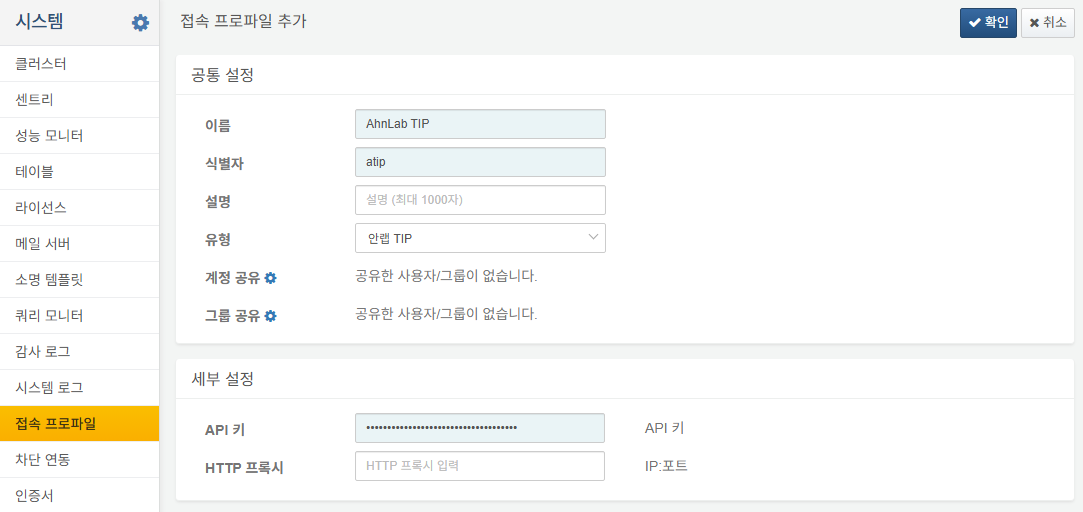
The following fields are required for configuration:
- Name: A unique name to identify the connect profile.
- Identifier: A unique ID used to reference the profile in queries.
- Type: Select
AhnLab TIP. - API Key: Your issued API key.
- HTTP Proxy: (Optional) Proxy in IP:Port format.
Once the connect profile is configured, you can use AhnLab TIP extension commands in queries or playbooks.
Build Logpresso Behavior Profile
Click the Build Now button for the AhnLab TIP Threat Actors behavior profile.

Enable Threat Intelligence Synchronization
To immediately synchronize threat intelligence feeds, run the following commands in the Logpresso shell:
logpresso> sonar.syncThreatFeed ahnlab_tip_ip
done
logpresso> sonar.syncThreatFeed ahnlab_tip_domain
done
logpresso> sonar.syncThreatFeed ahnlab_tip_url
done
logpresso> sonar.syncThreatFeed ahnlab_tip_md5
done
logpresso> sonar.syncThreatFeed ahnlab_tip_sha1
done
logpresso> sonar.syncThreatFeed ahnlab_tip_sha256
done
logpresso> sonar.syncThreatFeed ahnlab_tip_c2_sha256
done
logpresso> sonar.syncThreatFeed ahnlab_tip_c2_url
done
Verify Dashboard
Check the AhnLab TIP dashboard to ensure that threat indicators (IOCs) and threat actors are being displayed correctly.