


Install Guide
JDBC Driver Installation
Fasoo FSP (Fasoo Smart Print) uses PostgreSQL as its backend database, so you must first install the [PostgreSQL(https://logpresso.store/ko/apps/postgresql) from the Logpresso Store. Once the PostgreSQL app is installed, no further manual driver installation or additional configuration is required.
Logpresso Connect Profile Configuration
Please refer to this documentation to add a connection profile.
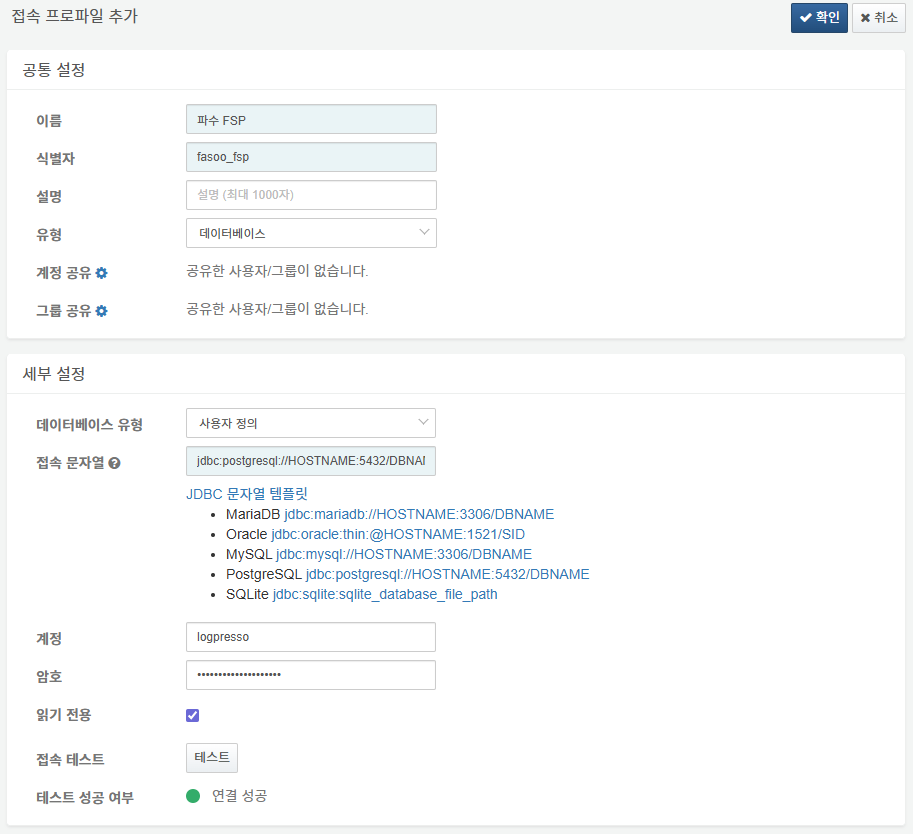
The following are the mandatory fields for the connection profile configuration:
- Name: A unique name to identify the connection profile.
- Identifier: A unique identifier for the connect profile to be used in Logpresso queries and other functions.
- Type: Select
Database. - Database Type: Select
User Defined. - Connection String: Click
jdbc:postgresql://HOSTNAME:5432/DBNAMEfrom the JDBC string templates, then modify the HOSTNAME, port, and DBNAME to match your operational environment. - Account: The database access account.
- Password: The database access password.
- Read Only: Select this option (Default: Unselected).
- Once all information is entered, perform a Connection Test and click OK to add the profile.
Logpresso Logger Configuration
Refer to this documentation to add a new logger. Note that the default dashboards and datasets reference tables with names starting with DLP_FASOO_FSP.
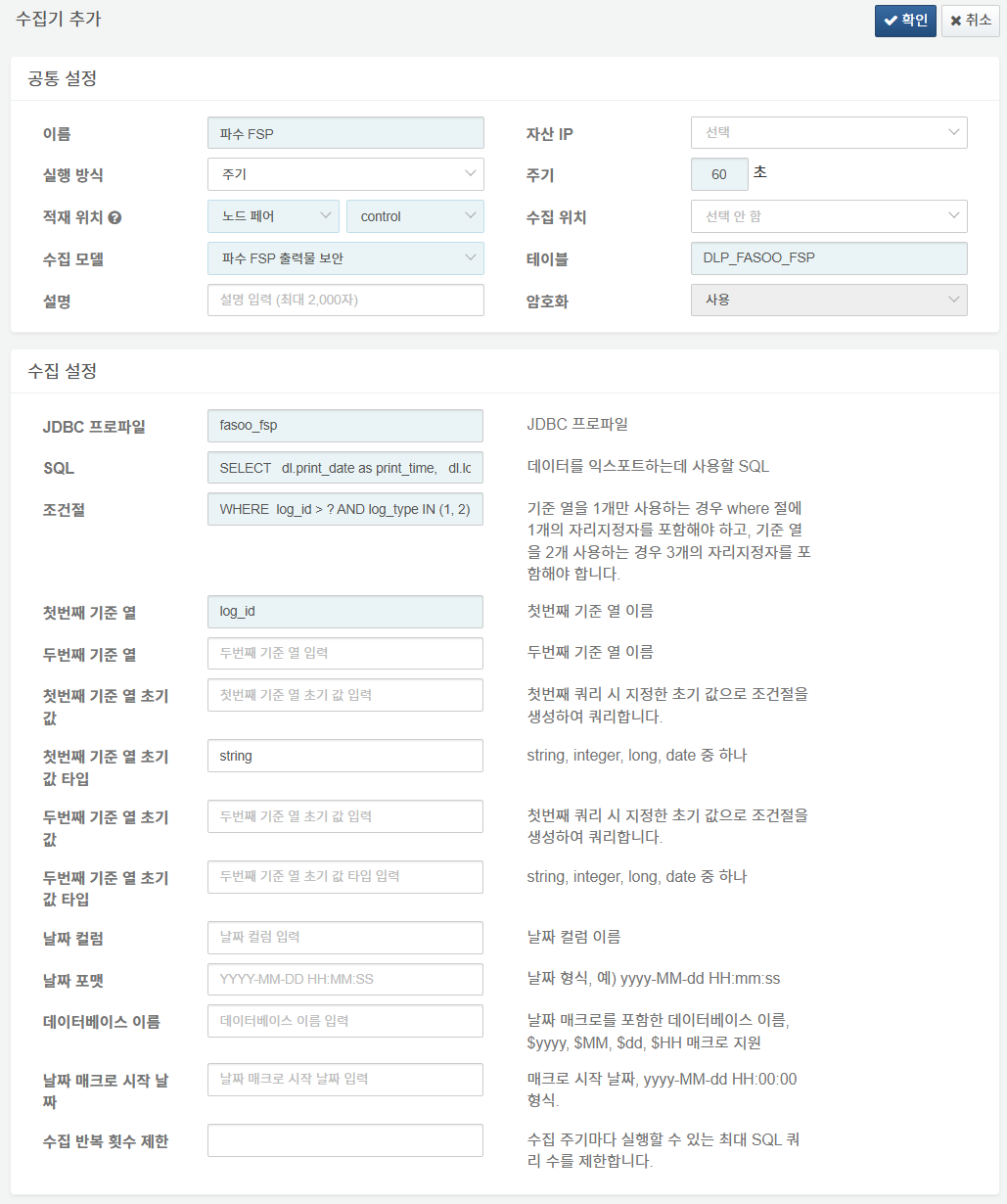
The following fields are mandatory for the logger configuration:
- Name: Enter a unique name to identify the logger.
- Interval: 60 seconds.
- Storage/Collection Node: Select the appropriate node based on your Logpresso platform configuration.
- Logger Model: Select
파수 FSP 출력물 보안. - Table: Enter a table name starting with
DLP_FASOO_FSP. - JDBC Profile: Enter the identifier of the connectn profile configured previously.
- SQL: The SQL statement used to query and process data for collection. You must include an ORDER BY {Reference_Column} clause to ensure sequential data loading.
- WHERE Clause: Enter WHERE log_id > ? (Modify according to your actual table columns if necessary).
- First Reference Column: Enter
log_id(Modify according to the specific column being collected). - First Reference Column Initial Value Type: Enter
string(Modify based on the data type of the reference column).
SQL Example
Customize the following SQL script to fit your operational environment:
SELECT
  dl.print_date as print_time,
  dl.log_id,
  dl.trans_id as client_log_uuid,
  CASE
      WHEN dl.event_result = 1 THEN '성공'
      WHEN dl.event_result = 2 THEN '실패'
      ELSE dl.event_result::TEXT
  END AS result,
  CASE
	    WHEN dl.print_result = 0 THEN '실패'
	    WHEN dl.print_result = 1 THEN '성공'
	    ELSE dl.print_result::TEXT
	END AS print_result,
  CASE
	    WHEN dl.detection_result = 0 THEN '실패'
	    WHEN dl.detection_result = 1 THEN '성공'
	    ELSE dl.detection_result::TEXT
	END AS detect_result,
  CASE
      WHEN dl.log_type = 1 THEN '(FSP4) 인쇄 로그'
      WHEN dl.log_type = 2 THEN '(FSP4) 검출 로그'
      ELSE dl.log_type::TEXT
  END AS log_type,
  CASE
      WHEN dl.purpose = 6 THEN 'PRINT(인쇄)'
      WHEN dl.purpose = 13 THEN 'SECURE_PRINT(워터마크 인쇄)'
      ELSE dl.purpose::TEXT
  END AS purpose,
  CASE
      WHEN dl.purpose_fail_reason = 0 THEN '정상'
      WHEN dl.purpose_fail_reason = 2 THEN '오프라인'
      ELSE purpose_fail_reason::TEXT
  END AS purpose_fail_reason,
  dl.user_code as user,
  dl.user_name,
  dl.user_dept_code as dept_code,
  dl.user_dept_name as dept_name,
  dl.user_position_name as user_job_title,
  dl.user_role_name as user_role,
  dl.sso_status,
  dl.device_id,
  dl.ip as client_ip,
  dl.mac_address as client_mac,
  CASE
      WHEN dl.client_os = 1 THEN 'Windows'
      WHEN dl.client_os = 2 THEN 'MAC'
      ELSE dl.client_os::TEXT
  END AS client_os,
  dl.client_os_version as client_os_ver,
  dl.location_type as location,
  dl.doc_name,
  dl.trace_id,
  dl.url,
  dl.printer_ip,
  dl.printer_name,
  dl.printer_driver_name as printer_driver,
  dl.printer_color_type as print_color,
  dl.total_print_page_count,
  dl.print_page_count,
  dl.print_copy_count,
  dl.print_reason,
  dl.detected_print_reason,
  dl.image_log_count,
  CASE
      WHEN dl.pull_print_yn = 0 THEN NULL
      WHEN dl.pull_print_yn = 1 THEN TRUE
      WHEN dl.pull_print_yn = 2 THEN FALSE
      ELSE NULL
  END AS use_pull_print,
  CASE
      WHEN dl.print_watermark_yn = 0 THEN NULL
      WHEN dl.print_watermark_yn = 1 THEN TRUE
      WHEN dl.print_watermark_yn = 2 THEN FALSE
      ELSE NULL
  END AS is_watermark_printed,
  CASE
      WHEN dl.masking_yn = 0 THEN NULL
      WHEN dl.masking_yn = 1 THEN TRUE
      WHEN dl.masking_yn = 2 THEN FALSE
      ELSE NULL
  END AS is_masked,
  CASE
      WHEN dl.pattern_yn = 0 THEN NULL
      WHEN dl.pattern_yn = 1 THEN TRUE
      WHEN dl.pattern_yn = 2 THEN FALSE
      ELSE NULL
  END AS is_pattern_detected,
  CASE
      WHEN dl.approval_yn = 0 THEN NULL
      WHEN dl.approval_yn = 1 THEN TRUE
      WHEN dl.approval_yn = 2 THEN FALSE
      ELSE NULL
  END AS is_print_approved,
  CASE
      WHEN dl.approval_type = 1 THEN '승인'
      ELSE dl.approval_type::TEXT
  END AS approval_type,
  CASE
      WHEN dl.print_log_show = 0 THEN NULL
      WHEN dl.print_log_show = 1 THEN TRUE
      WHEN dl.print_log_show = 2 THEN FALSE
      ELSE NULL
  END AS is_print_log_visible,
  CASE
      WHEN dl.print_log_text_file_show = 0 THEN NULL
      WHEN dl.print_log_text_file_show = 1 THEN TRUE
      WHEN dl.print_log_text_file_show = 2 THEN FALSE
      ELSE NULL
  END AS is_print_text_file_visible,
  CASE
      WHEN dl.print_log_image_file_show = 0 THEN NULL
      WHEN dl.print_log_image_file_show = 1 THEN TRUE
      WHEN dl.print_log_image_file_show = 2 THEN FALSE
      ELSE NULL
  END AS is_print_image_file_visible,
  CASE
      WHEN dl.detection_log_show = 0 THEN NULL
      WHEN dl.detection_log_show = 1 THEN TRUE
      WHEN dl.detection_log_show = 2 THEN FALSE
      ELSE NULL
  END AS is_detect_log_visible,
  CASE
      WHEN dl.detection_log_text_file_show = 0 THEN NULL
      WHEN dl.detection_log_text_file_show = 1 THEN TRUE
      WHEN dl.detection_log_text_file_show = 2 THEN FALSE
      ELSE NULL
  END AS is_detect_text_file_visible,
  CASE
      WHEN dl.detection_log_image_file_show = 0 THEN NULL
      WHEN dl.detection_log_image_file_show = 1 THEN TRUE
      WHEN dl.detection_log_image_file_show = 2 THEN FALSE
      ELSE NULL
  END AS is_detect_image_file_visible,
  CASE
      WHEN fl.file_type = 2 AND COUNT(fl.trans_id) >= fl.file_count THEN '상태의미파악필요-1'
      ELSE '상태의미파악필요-2'
  END AS print_image_upload_status,
  dl.application_name as process,
  dl.pid,
  dl.domain_code,
  CASE
      WHEN product = 0 THEN '해당 사항 없음'
      WHEN product = 1 THEN 'FED-N'
      ELSE product::TEXT
  END AS product
FROM (SELECT
        print_date,
        log_id,
        trans_id,
        event_result,
        print_result,
        detection_result,
        log_type,
        purpose,
        purpose_fail_reason,
        user_code,
        user_name,
        user_dept_code,
        user_dept_name,
        user_position_name,
        user_role_name,
        sso_status,
        device_id,
        ip,
        mac_address,
        client_os,
        client_os_version,
        location_type,
        doc_name,
        trace_id,
        url,
        printer_ip,
        printer_name,
        printer_driver_name,
        printer_color_type,
        total_print_page_count,
        print_page_count,
        print_copy_count,
        print_reason,
        detected_print_reason,
        image_log_count,
        pull_print_yn,
        print_watermark_yn,
        masking_yn,
        pattern_yn,
        approval_yn,
        approval_type,
        print_log_show,
        print_log_text_file_show,
        print_log_image_file_show,
        detection_log_show,
        detection_log_text_file_show,
        detection_log_image_file_show,
        application_name,
        pid,
        domain_code,
        product
      FROM document_log
      $where
      ) as dl
LEFT OUTER JOIN file_log fl
ON fl.trans_id = dl.trans_id
AND fl.log_type = 1
AND fl.file_type = 2
GROUP BY dl.log_id, dl.trans_id, dl.event_result, dl.print_result, dl.detection_result, dl.log_type, dl.purpose, dl.purpose_fail_reason, dl.user_code, dl.user_name, dl.user_dept_code, dl.user_dept_name, dl.user_position_name, dl.user_role_name, dl.sso_status, dl.device_id, dl.ip, dl.mac_address, dl.client_os, dl.client_os_version, dl.location_type, dl.doc_name, dl.trace_id, dl.url, dl.printer_ip, dl.printer_name, dl.printer_driver_name, dl.printer_color_type, dl.total_print_page_count, dl.print_page_count, dl.print_copy_count, dl.print_reason, dl.detected_print_reason, dl.image_log_count, dl.pull_print_yn, dl.print_watermark_yn, dl.masking_yn, dl.pattern_yn, dl.approval_yn, dl.approval_type, dl.print_log_show, dl.print_log_text_file_show, dl.print_log_image_file_show, dl.detection_log_show, dl.detection_log_text_file_show, dl.detection_log_image_file_show, dl.application_name, dl.pid, dl.domain_code, dl.product, dl.print_date, fl.file_count, fl.file_type
ORDER BY log_id;