


Install Guide
JDBC Driver Installation
Fasoo FDR (Fasoo Data Radar) uses PostgreSQL as its backend database. First, install the PostgreSQL from the Logpresso Store. No additional manual driver installation is required after the app is installed.
Logpresso Connect Profile Configuration
Refer to this documentation to add a connection profile.
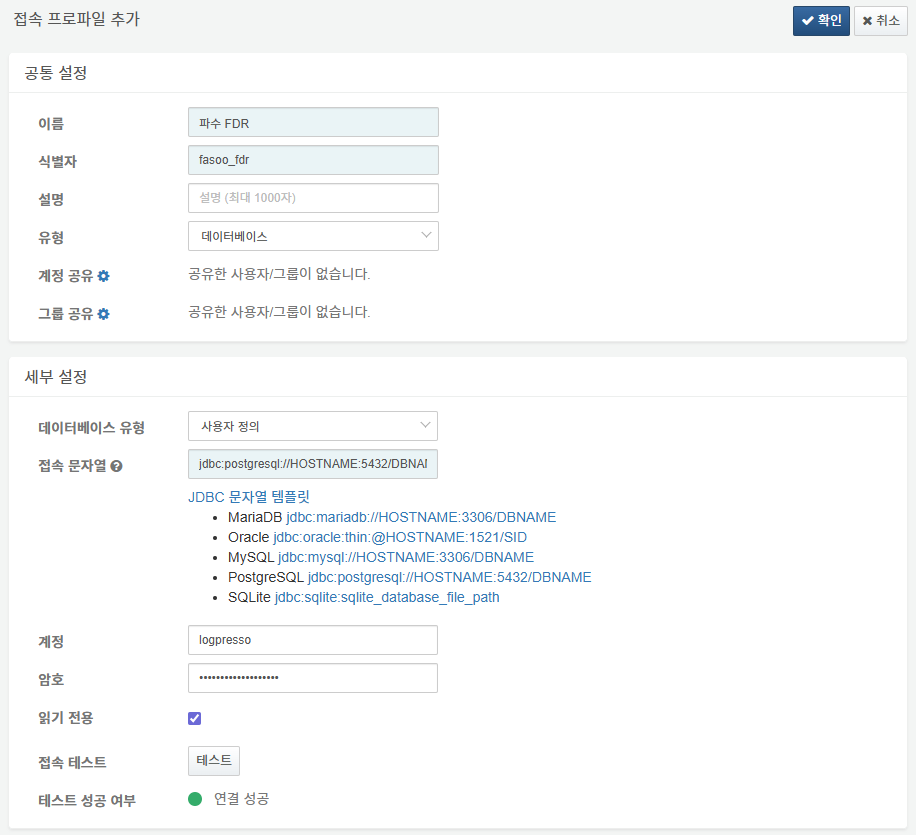
The following fields are mandatory for the connect profile configuration:
- Name: A unique name to identify the connection profile.
- Identifier: A unique ID used for referencing the profile in Logpresso queries and scripts.
- Type: Select
Database. - Database Type: Select User-defined`.
- Connection String: Under the JDBC string templates, click
jdbc:postgresql://HOSTNAME:5432/DBNAMEand modify the HOSTNAME, Port, and DBNAME to match your environment. - Account: Database access account.
- Password: Database access password.
- Read Only: Select this option (Default: Unselected).
Once all information is entered, perform a Connection Test and click OK to add the profile.
Logpresso Logger Configuration
Refer to this documentation to add a logger. The default dashboards and datasets reference tables with names starting with DSPM_FASOO_FDR.
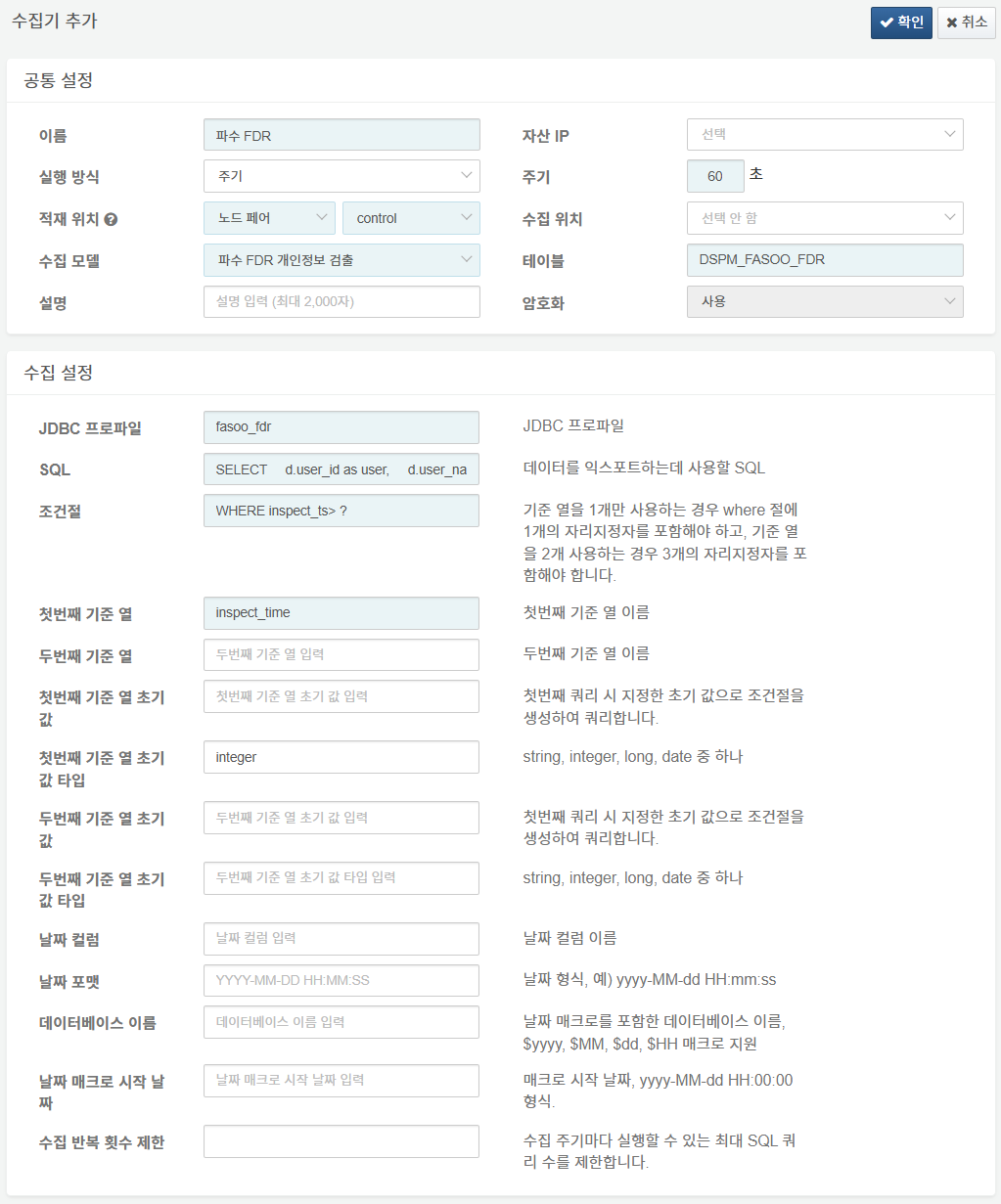
The following fields are mandatory for the logger configuration:
- Name: A unique name to identify the logger.
- Interval: 60 seconds.
- Storage/Collection Node: Select the appropriate node based on your Logpresso platform architecture.
- Logger Model: Select
파수 FDR 개인정보 검출. - Table: Enter a table name starting with
DSPM_FASOO_FDR. - JDBC Profile: Enter the identifier of the connection profile configured previously.
- SQL: The SQL statement used to query and process the data. To ensure sequential loading, you must include an ORDER BY {Reference Column} clause.
- WHERE Clause: Enter WHERE inspect_ts > ? (Modify according to your actual table columns if necessary).
- First Reference Column: Enter
inspect_time(Modify according to the collected column name). - First Reference Column Initial Value Type: Enter
integer(Modify according to the column's data type).
SQL Example Customize the following SQL example to fit your specific operational environment:
SELECT
    d.user_id as user,
    d.user_name,
    file_code,
    file_name,
    file_path,
    file_size,
    CASE WHEN format_code = 0 THEN '기타'
        WHEN format_code = 1 THEN 'MS 오피스'
        WHEN format_code = 2 THEN '한컴오피스'
        WHEN format_code = 3 THEN '텍스트'
        WHEN format_code = 4 THEN 'PDF'
        WHEN format_code = 5 THEN 'RTF'
        WHEN format_code = 6 THEN '오픈오피스'
        WHEN format_code = 7 THEN 'iWork'
        WHEN format_code = 99 THEN '알려지지 않음'
        ELSE '미분류'
        END as file_type,
    extension_group_code,
    file_status,
    file_location,
    create_ts as file_created,
    modify_ts as file_modified,
    access_ts as file_accessed,
    CASE WHEN encryption_code = 1 THEN '일반 파일'
        WHEN encryption_code = 2 THEN 'FED 파일'
        WHEN encryption_code = 3 THEN 'FDR 파일'
        WHEN encryption_code = 4 THEN 'Wrapsody 파일'
        WHEN encryption_code = 5 THEN '타사 DRM 파일'
        WHEN encryption_code = 6 THEN 'FED(사외) 파일'
        WHEN encryption_code = 7 THEN 'FeDM 파일'
        WHEN encryption_code = 8 THEN 'PII 파일'
        WHEN encryption_code = 9 THEN 'Wrapsody eCo 파일'
        WHEN encryption_code = 1001 THEN 'MIP 파일'
        ELSE '미분류 파일'
        END as encryption_type,
    ds.device_code,
    d.device_desc as device_name,
    d.ip_addresses as device_ip_list,
    d.device_type,
    scan_id,
    detection_count,
    pattern_types as pattern_type_count,
    pattern_count,
    pattern_info,
    ruleset_count,
    ruleset_info,
    primary_ruleset_code as primary_ruleset,
    classification_code,
    ds.entry_ts as entry_time,
    isolate_ts as isolate_time,
    tag_info,
    add_info,
    inspect_ts as inspect_time,
    initial_ts as file_detected
FROM
    fdrlog_detection_status ds
LEFT OUTER JOIN
    fdrlog_classification c
ON
    ds.classification_code = c.code
INNER JOIN
    fdrlog_device_view d
ON
    ds.device_code = d.device_code
INNER JOIN
    fdrlog_ruleset r
ON
    ds.primary_ruleset_code = r.code
$where
ORDER BY ds.inspect_ts;